
Salesforce + ServiceNow + n8n: One Unified Automation Layer
Sasha Ray
6th Oct, 2026
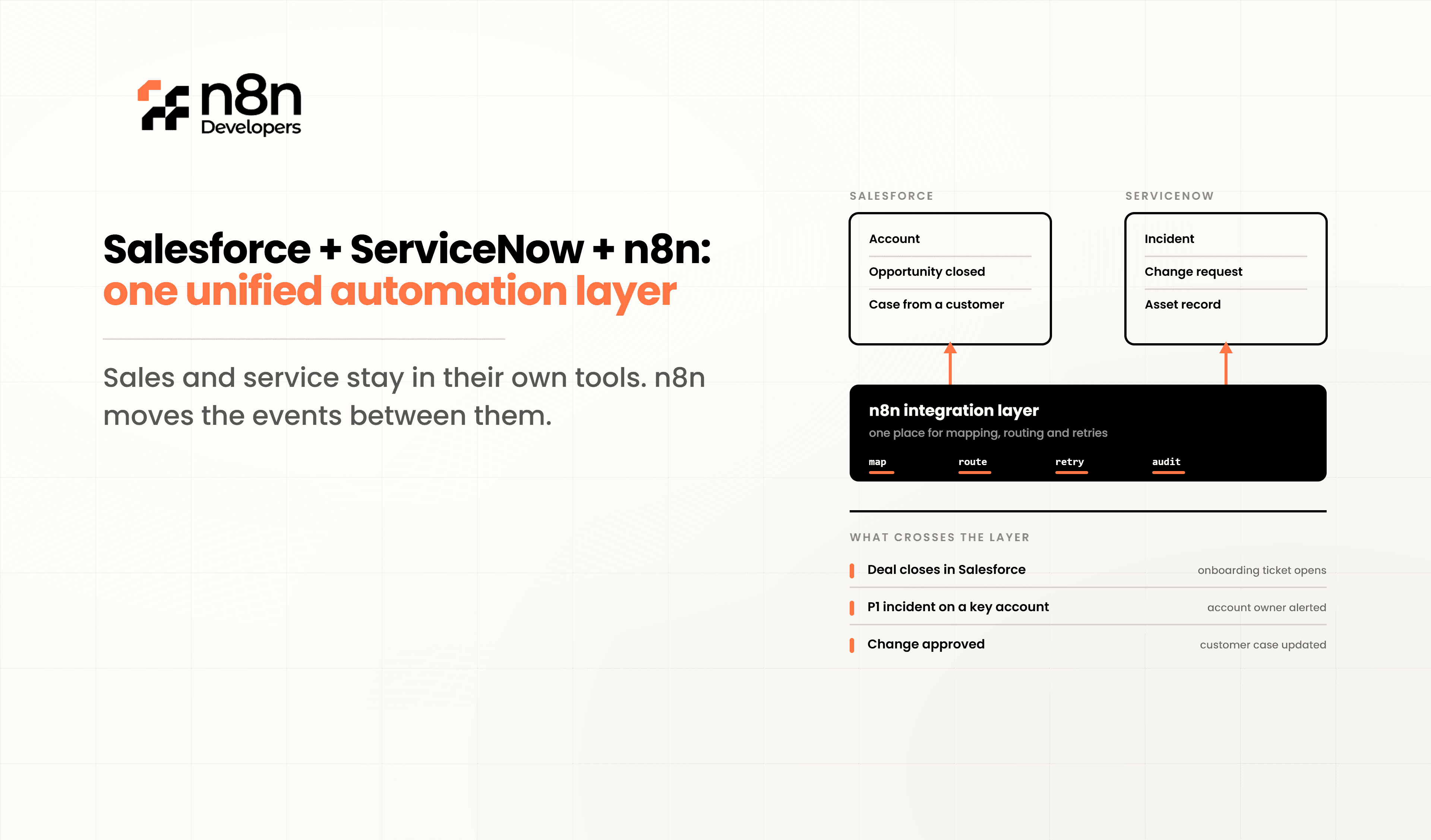
Salesforce + ServiceNow + n8n: One Unified Automation Layer
Every growing IT team hits the same wall: Salesforce runs your sales and customer data, ServiceNow runs your IT service management, but the two rarely talk to each other cleanly. Tickets get raised manually, data gets re-typed, and teams waste hours on tasks that should take seconds. This is exactly where a unified automation layer built on n8n changes the game.
The Problem: Two Powerful Platforms, No Real Connection
Salesforce and ServiceNow are both enterprise-grade systems, but out of the box, they weren't designed to sync automatically. Common pain points include:
Sales reps raising incidents manually in ServiceNow after a Salesforce case escalates
Duplicate customer records across both systems
No real-time visibility between sales and support teams
Custom scripts that break every time an API changes
These gaps slow down response times and create data inconsistency across departments — a costly problem for any IT-driven business.
The Solution: n8n as the Unified Automation Layer
n8n is an open-source workflow automation tool that acts as the connective tissue between Salesforce, ServiceNow, and hundreds of other apps. Instead of writing brittle custom integration code, you build visual workflows that trigger, transform, and sync data automatically.
With n8n automation, you can:
Auto-create a ServiceNow ticket the moment a Salesforce case is escalated
Sync customer and account data bi-directionally in real time
Trigger Slack or email alerts when SLAs are at risk
Route approvals across both platforms without manual handoffs
Build custom logic with conditional branches, error handling, and retries — something rigid native connectors can't offer
Because n8n supports both low-code nodes and custom JavaScript, it fits teams that want quick automation and teams that need deep, tailored logic.
Why Businesses Are Choosing This Stack
At N8n Developers, we've seen companies cut manual ticket creation by over 70% simply by connecting Salesforce and ServiceNow through n8n workflows. The benefits stack up fast:
Speed
— workflows that used to take a developer days to script are built in hours
Flexibility
— n8n's self-hosted option means full control over data and security
Cost efficiency
— no per-integration licensing fees like many iPaaS tools charge
Scalability
— add new apps to the same automation layer without rebuilding from scratch
This is why Salesforce ServiceNow integration through n8n is quickly becoming the standard approach for IT teams that want one automation backbone instead of dozens of disconnected scripts.
How the Unified Automation Layer Works
Think of n8n as the control tower sitting between your apps:
Trigger
— an event happens in Salesforce (new case, updated opportunity, etc.)
Process
— n8n receives the trigger, applies your business logic, filters, and transforms the data
Action
— n8n pushes the update into ServiceNow (or any other connected system)
Feedback loop
— status changes in ServiceNow can flow back into Salesforce automatically
This closed-loop system means both platforms stay in sync without a single manual step, and your teams always work from accurate, up-to-date data.
Common Use Cases
IT Service Desk Automation
: Auto-generate ServiceNow incidents from Salesforce support cases
Customer 360 Sync
: Keep account and contact data identical across both platforms
SLA Monitoring
: Trigger escalations automatically when response times slip
Change Management
: Route Salesforce-originated change requests through ServiceNow approval flows
Reporting Dashboards
: Pull combined data from both systems into a single automated report
Why You Should Hire n8n Expert Help
Building a reliable unified automation layer isn't just about dragging a few nodes together — it requires solid API knowledge, error handling design, and security best practices for enterprise systems like Salesforce and ServiceNow. That's why businesses choose to Hire n8n Expert teams instead of trial-and-error in-house.
An experienced n8n developer will:
Map your exact business logic before building workflows
Handle authentication securely (OAuth2, API keys, credentials management)
Build in retries, logging, and error alerts so nothing silently fails
Optimize workflows for performance at scale
How Salesforce, ServiceNow, and n8n Work Together
Think of Salesforce as your customer management platform and ServiceNow as your IT operations platform. n8n acts as the intelligent automation engine between them.
Typical workflow:
Customer submits a support request.
Salesforce records the customer information.
n8n validates the data.
ServiceNow automatically creates an incident.
Assigned engineers receive notifications.
Status updates sync back to Salesforce.
Customers receive automatic progress emails.
Management dashboards update instantly.
This automation removes repetitive work while ensuring every department has the latest information.
Common Enterprise Automation Use Cases
Customer Support Automation
When a high-priority customer case is created in Salesforce, the workflow can automatically generate a ServiceNow incident, notify technical teams, and update customer records.
IT Asset Management
New employee onboarding can trigger ServiceNow asset requests, software provisioning, account creation, and Salesforce user permissions without manual intervention.
Sales-to-Service Handoff
After closing a deal, customer implementation tasks, project assignments, onboarding documentation, and service requests can automatically begin.
Incident Escalation
Critical ServiceNow incidents can instantly notify Salesforce account managers so enterprise customers receive proactive communication.
Approval Automation
Automate approvals for discounts, contracts, infrastructure requests, software licenses, and procurement using connected workflows.
Key Benefits
Faster Operations
Automation significantly reduces processing time by eliminating manual data transfer.
Better Data Accuracy
Connected systems ensure information stays synchronized across every platform.
Reduced Operational Costs
Businesses spend less time on repetitive administrative tasks and more time on strategic work.
Improved Customer Experience
Support teams receive complete customer information faster, reducing response times.
Scalable Architecture
As business applications grow, additional integrations can be connected without rebuilding existing workflows.
Ready to Build Your Unified Automation Layer?
If manual data entry, missed tickets, and disconnected systems are slowing your team down, it's time to automate. Get a free workflow audit and see exactly where Salesforce, ServiceNow, and n8n can save you hours every week.
Hire n8n Expert developers today and turn your fragmented systems into one seamless automation layer.
Talk to our automation team — we specialize in Information Technology solutions and custom n8n development for businesses of every size.
Frequently Asked Questions
It automatically syncs data and triggers actions between the two platforms without manual work
Yes, n8n offers more flexibility, custom logic, and lower cost than most native or third-party connectors.
Yes, n8n can be fully self-hosted, giving you complete control over sensitive business data.
Most standard workflows can be built and deployed within a few days by an experienced developer.
Experts ensure secure authentication, proper error handling, and scalable workflows from day one.

