
Why Enterprise Software Fails Without an n8n Integration Layer
Sasha Ray
31st Aug, 2026
Why Enterprise Software Fails Without an n8n Integration Layer
Modern businesses rely on multiple enterprise applications to manage operations, customer relationships, finance, HR, marketing, and logistics. While these platforms are powerful individually, they often fail to deliver expected business value because they operate in isolation. This is where an **n8n** becomes essential.
Without a centralized integration solution, organizations face disconnected workflows, duplicated data, manual processes, and expensive maintenance. As companies adopt more SaaS platforms and cloud services, these problems become even more difficult to manage.
In this article, we'll explain why enterprise software struggles without an n8n Integration Layer, the common integration challenges businesses face, and how n8n provides a scalable automation solution.
What Is an n8n Integration Layer?
An n8n acts as the communication bridge between different business systems. Instead of connecting every application directly to every other application, n8n provides one centralized automation platform where all systems exchange data.
Typical enterprise applications include:
CRM systems
ERP platforms
HR software
Accounting software
Marketing tools
Customer support platforms
Internal databases
AI services
Cloud storage
Rather than building dozens of custom integrations, businesses create workflows inside n8n that automate communication between all systems.
Why Enterprise Software Often Fails
Enterprise software rarely fails because the software itself is poor. Most failures happen because data cannot move efficiently across departments.
Common issues include:
Data Silos
Each department stores information in separate systems.
Sales updates the CRM.
Finance updates ERP.
Support manages tickets elsewhere.
Without synchronization, employees work with outdated information.
Manual Data Entry
Employees repeatedly copy data between applications.
This creates:
Human errors
Duplicate records
Lost productivity
Delayed decision making
Automation eliminates repetitive work.
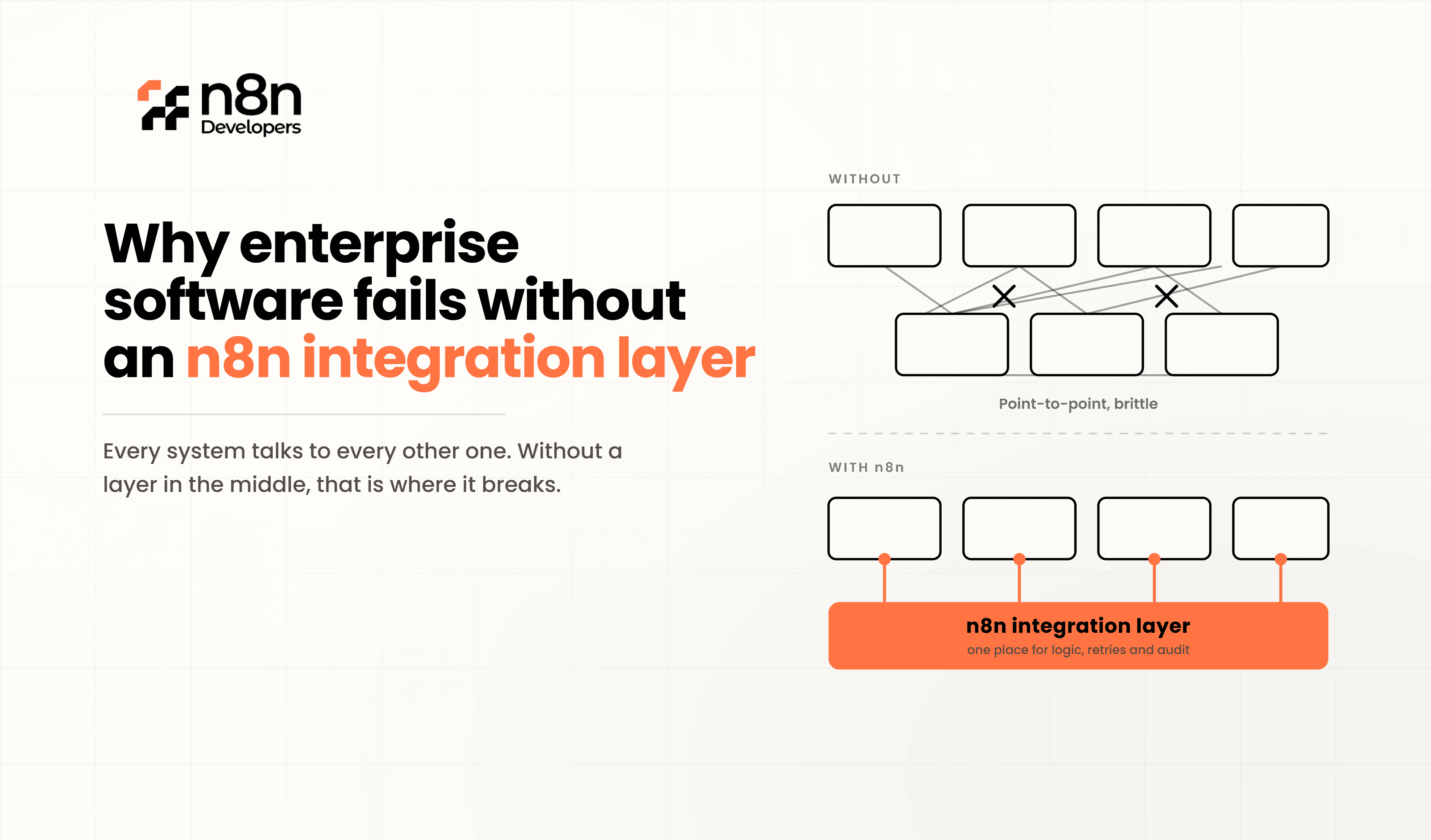
Point-to-Point Integrations Become Complex
Many companies connect applications directly.
Example:
CRM → ERP
ERP → HR
HR → Payroll
CRM → Marketing
As systems grow, integration becomes impossible to maintain.
This creates what developers call "integration spaghetti."
Poor Visibility
Managers cannot see real-time business information because every application stores its own version of the truth.
Reports become inaccurate.
Business decisions slow down.
High Maintenance Costs
Every API update requires developers to modify multiple integrations.
Maintenance costs continue increasing as software grows.
How an n8n Integration Layer Solves These Problems
Instead of creating hundreds of direct connections, n8n becomes the central automation hub.
CRM
│
ERP ──► n8n Integration Layer ──► AI Services
│
HR
│
Finance
│
Slack
│
Every application communicates through n8n rather than building separate integrations.
Benefits include:
Centralized workflows
Easier maintenance
Better monitoring
Faster automation
Improved scalability
Key Advantages of Using an n8n Integration Layer
Centralized Automation
All business workflows exist in one location.
Developers can easily monitor, update, and improve automation without touching every application.
Low-Code Development
n8n provides a visual workflow builder that reduces development time.
Developers still have full flexibility using:
JavaScript
HTTP Requests
REST APIs
GraphQL
SQL
Webhooks
Easy API Integration
Almost every enterprise application exposes APIs.
n8n can connect with:
SAP
Salesforce
Microsoft Dynamics
HubSpot
ServiceNow
MySQL
PostgreSQL
MongoDB
OpenAI
AWS
Google Workspace
This allows businesses to automate nearly every process.
Better Error Handling
Enterprise integrations eventually fail.
n8n includes:
Retry logic
Error workflows
Notifications
Conditional branching
Logging
This dramatically improves system reliability.
AI-Ready Architecture
Modern enterprises increasingly integrate AI into business operations.
n8n allows businesses to automate:
Document processing
Customer support
Email generation
Knowledge retrieval
AI agents
Predictive workflows
without rebuilding existing systems.
Real Enterprise Example
Imagine an online retailer.
Without integration:
Sales team updates CRM manually.
Finance exports invoices daily.
Warehouse receives Excel files.
Marketing manually imports customer lists.
Customer support lacks order information.
Result:
Delays
Duplicate work
Customer complaints
Reporting errors
With an n8n Integration Layer:
Customer places an order.
CRM updates automatically.
ERP generates invoice.
Warehouse receives shipping request.
Customer gets confirmation email.
Slack notifies operations.
AI predicts delivery delays.
Dashboard updates instantly.
Everything happens automatically.
Why Developers Prefer n8n
Developers appreciate n8n because it combines flexibility with simplicity.
Features include:
Open-source architecture
Self-hosted deployment
Cloud hosting
Version control
API-first design
Reusable workflows
Custom JavaScript functions
Enterprise scalability
This makes it suitable for startups as well as large organizations.
N8n Developers delivers Information Technology solutions and experienced developers who build secure, scalable, and enterprise-ready automation workflows. Whether you need system integrations, API automation, AI workflows, or custom business process automation, our team helps organizations streamline operations with reliable n8n solutions.
Best Practices for Enterprise Integration
To maximize the value of an **n8n Integration Layer**:
Design modular workflows.
Use reusable sub-workflows.
Secure API credentials.
Monitor execution logs.
Handle failures with retries.
Document every workflow.
Use environment variables.
Implement role-based access.
These practices ensure long-term scalability.
Enterprise software doesn't fail because organizations choose the wrong applications—it fails because those applications cannot communicate effectively. An **n8n** eliminates disconnected systems, reduces manual work, improves data accuracy, and enables scalable automation across the business.
As organizations continue adopting cloud services, AI platforms, and modern APIs, having a centralized integration layer is no longer optional. It is a critical part of building reliable, future-ready enterprise systems.
If you're planning to modernize your business automation, our team provides Information Technology services and experienced developers to design, implement, and maintain scalable n8n integration solutions tailored to your enterprise needs.
How N8n Developers Solves This for Enterprises
This is exactly the gap that N8n Developers was built to close. As a technology and development partner focused on workflow automation, N8n Developers designs and implements custom n8n integration layers that connect enterprise software into a single, automated operational flow — instead of a patchwork of disconnected tools.
Our team builds automation architectures around your actual business processes: lead management, order processing, customer support, finance operations, and reporting — all connected, all synchronized, all running without manual intervention. Rather than forcing your teams to adapt to rigid software limitations, we build the integration layer that makes your existing enterprise stack finally function as one system.
Ready to connect all your enterprise systems with an n8n Integration Layer?
Partner with N8n Developers for enterprise-grade automation, custom workflow development, API integrations, AI-powered solutions, and dedicated developers who help your business scale faster with reliable Information Technology services.
Frequently Asked Questions
It is a centralized automation platform that connects multiple enterprise applications through workflows.
Most fail because disconnected systems create data silos and manual processes.
Yes, n8n supports APIs, databases, webhooks, and hundreds of enterprise applications.
Yes, it offers scalable, secure, and self-hosted automation for enterprise environments.
Basic workflows are low-code, while advanced automation supports JavaScript and custom API development.

