
Network Security for Self-Hosted n8n Guide | n8n
Sasha Ray
13th Oct, 2026
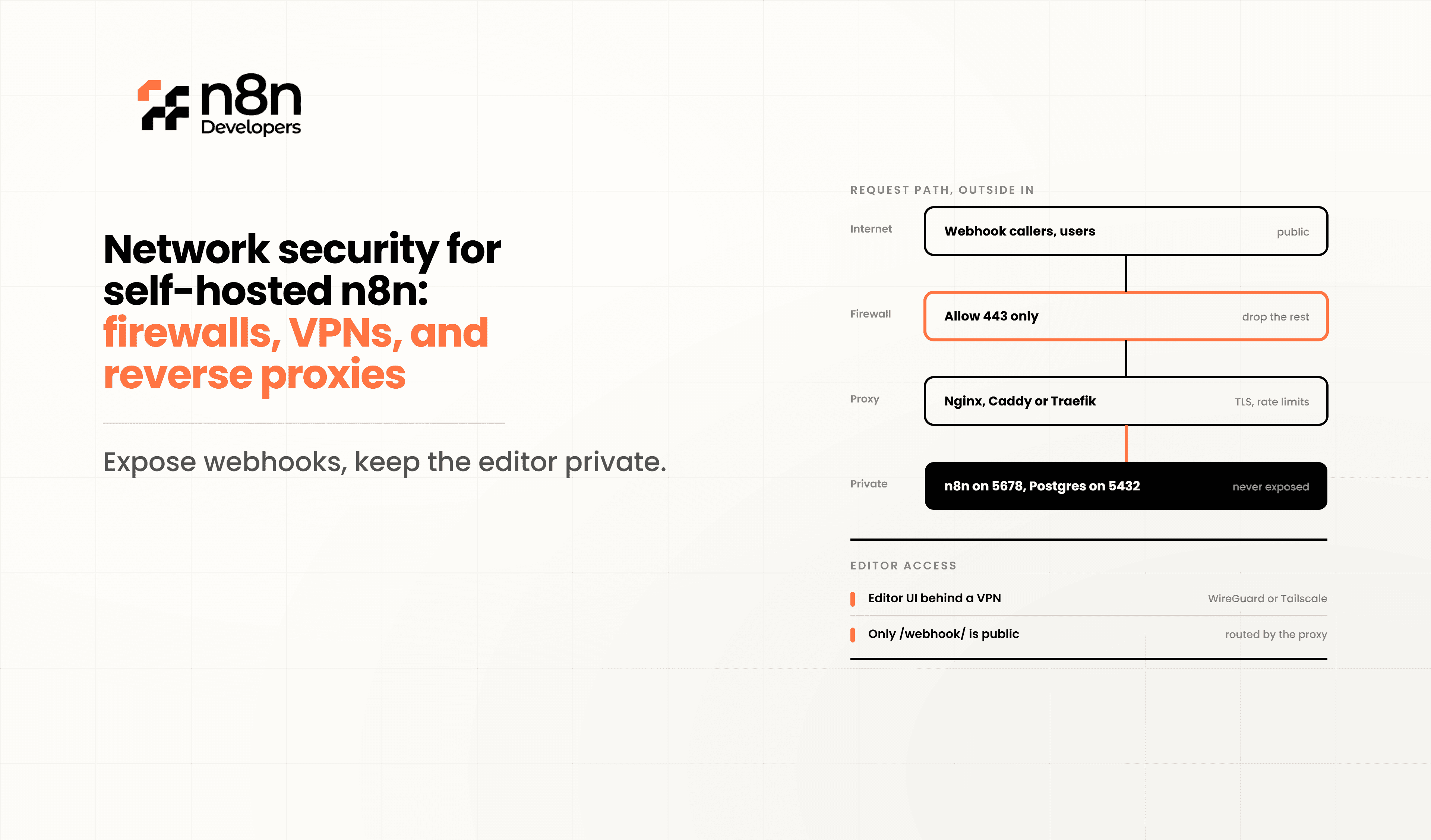
Network Security for Self-Hosted n8n: Firewalls, VPNs, and Reverse Proxies
Self-hosting n8n gives organizations complete control over automation workflows, infrastructure, and sensitive business data. However, exposing your automation platform directly to the internet without proper security controls creates unnecessary risks. A secure deployment requires multiple layers of protection that prevent unauthorized access while ensuring legitimate users can safely interact with workflows.
This guide explains how to secure a self-hosted n8n instance using firewalls, VPNs, reverse proxies, HTTPS, and other production-ready security practices. Whether you're running automation on a VPS, dedicated server, or cloud infrastructure, implementing these measures significantly reduces attack surfaces and improves overall reliability.
Why Network Security Matters
Automation platforms often connect with CRMs, ERPs, cloud storage, payment gateways, email services, and databases. If attackers gain access to your server, they may also gain access to every connected service.
Common security risks include:
Unauthorized server access
Credential theft
API key exposure
Data interception
Distributed denial-of-service (DDoS) attacks
Misconfigured public endpoints
Brute-force login attempts
A layered security approach minimizes these threats.
Build Multiple Security Layers
Instead of relying on a single protection mechanism, use several independent layers.
A recommended architecture looks like this:
Internet
│
Firewall
│
Reverse Proxy
│
HTTPS (SSL/TLS)
│
Authentication
│
n8n Application
│
Database
Each layer blocks different attack vectors.
Configure a Firewall
A firewall is the first line of defense.
Only expose the ports that are absolutely necessary.
Recommended configuration:
Allow SSH only from trusted IP addresses
Open port 443 for HTTPS
Redirect port 80 to HTTPS
Block all unnecessary ports
Deny unknown incoming traffic by default
Example:
Allow:
22 (Restricted)
80
443
Block:
Everything else
Cloud providers also provide security groups that act as additional firewalls.
Examples include:
AWS Security Groups
Azure Network Security Groups
Google Cloud Firewall Rules
Protect Administrative Access with VPNs
One of the safest approaches is preventing direct public access altogether.
Instead of exposing the administration interface publicly:
Connect through a VPN
Restrict access to internal users
Hide private dashboards
Prevent unauthorized login attempts
Popular VPN options include:
WireGuard
OpenVPN
Tailscale
VPNs encrypt network traffic while providing secure remote access to your automation server.
Use a Reverse Proxy
A reverse proxy sits between users and your application.
Benefits include:
SSL termination
Load balancing
Request filtering
HTTP compression
Security headers
Rate limiting
Better performance
Popular reverse proxies:
Nginx
Traefik
Caddy
HAProxy
Example architecture:
User
│
▼
Reverse Proxy
│
▼
n8n
Instead of exposing n8n directly, only the reverse proxy communicates with external users.
Always Enable HTTPS
Never run production automation over HTTP.
HTTPS encrypts:
Login credentials
API tokens
Cookies
Workflow requests
Webhook traffic
Free SSL certificates can be obtained from Let's Encrypt.
Benefits include:
Data encryption
Better browser trust
Improved SEO
Compliance requirements
Reduced interception risks
Enable Authentication
Even behind a firewall, authentication is essential.
Recommended practices:
Strong administrator passwords
Multi-factor authentication where supported
Disable unused accounts
Use unique credentials
Rotate passwords regularly
Avoid sharing administrator accounts among team members.
Secure Webhooks
Webhooks often become public endpoints.
Best practices:
Validate request signatures
Use secret tokens
Limit allowed IP addresses
Verify request origins
Disable unused webhooks
Never leave testing webhooks active in production.
Apply Rate Limiting
Rate limiting protects servers against:
Brute-force attacks
API abuse
Automated scanners
Traffic spikes
Most reverse proxies allow rules such as:
100 requests/minute
per IP
This significantly reduces malicious traffic.
Keep Software Updated
Outdated software introduces known vulnerabilities.
Regularly update:
Operating system
Docker images
Reverse proxy
Database
SSL certificates
Dependencies
Enable automated security updates whenever possible.
Protect Secrets
Avoid storing credentials in plain text.
Use:
Environment variables
Secret management tools
Encrypted storage
Access control policies
Never commit API keys to Git repositories.
Monitor Your Infrastructure
Continuous monitoring helps detect suspicious behavior before it becomes a serious issue.
Monitor:
CPU usage
Memory
Failed login attempts
Firewall logs
SSL expiration
Reverse proxy logs
Workflow failures
Useful monitoring tools:
Prometheus
Grafana
Uptime Kuma
Loki
Backup Your Environment
A secure system also requires reliable backups.
Back up:
Database
Workflows
Credentials
Configuration files
Docker Compose files
SSL certificates
Store backups securely and test restoration procedures regularly.
Security Checklist
Before deploying to production, verify the following:
Firewall configured
HTTPS enabled
Reverse proxy installed
VPN configured
Strong authentication enabled
Server updated
Secrets protected
Monitoring active
Backups tested
Rate limiting enabled
How N8n Developers
Implementing production-grade security requires expertise in infrastructure, networking, and workflow automation. N8n Developers provides Information Technology solutions and experienced developers who design, deploy, and secure self-hosted automation environments. From firewall configuration and reverse proxy implementation to VPN integration and ongoing maintenance, our team helps businesses build secure, scalable, and reliable automation platforms.
Best Practices Summary
For production environments:
Never expose services unnecessarily.
Use HTTPS everywhere.
Protect servers with firewalls.
Access administration through VPNs.
Place reverse proxies in front of applications.
Monitor continuously.
Apply updates promptly.
Back up critical data regularly.
Following these best practices greatly reduces security risks while improving the stability and performance of self-hosted automation deployments.
Securing a self-hosted **n8n** automation platform requires more than installing software. Firewalls, VPNs, reverse proxies, HTTPS, authentication, monitoring, and backups all work together to create a resilient infrastructure. Investing time in proper network security protects sensitive business data, reduces downtime, and ensures your automation environment remains reliable as it grows.
If you're planning a production deployment, partnering with experienced professionals can simplify implementation and reduce security risks from day one.
Frequently Asked Questions
It protects workflows, credentials, and connected business systems from unauthorized access.
A reverse proxy adds HTTPS, security headers, rate limiting, and hides the application server.
Yes, a VPN provides secure remote access without exposing the admin interface to the public internet.
Typically only ports 80 and 443 are public, while SSH should be restricted to trusted IP addresses.
Use firewalls, VPNs, reverse proxies, HTTPS, strong authentication, monitoring, and regular updates.

